
I decided to use cryptocurrency to turn my hobby music into NFTs and sell them. So, I decided to use a VPN for security.
A VPN is a technology that creates a virtual tunnel over the internet and encrypts data during transmission to prevent malicious users from stealing your information. I believe it’s an essential feature, especially when connecting to public Wi-Fi on a smartphone. It’s also necessary to prevent the leakage of sensitive information, such as credit card details and cryptocurrency data.
I’m currently using NordVPN. In this post, I’d like to share my review of NordVPN based on my experience using it.
Please read the article below for information on signing up and how to use it.

For more details on pricing and plans, please read the article below.
NordVPN Features
- Fast connection speeds
- High ability to bypass video streaming restrictions
- Supports up to 6 devices
- Comprehensive 24/7 customer support available in Japanese
- 30-day money-back guarantee
- Guaranteed no-logs policy
What is NordVPN?
NordVPN is headquartered in Panama City, Panama.
Its Japanese subsidiary is located in Dogenzaka, Shibuya-ku, Tokyo. The contact page on the Japanese website lists an email address and phone number.
It is a relatively new company, established in 2012. It is a major player in the VPN service industry.
As of October 29, 2022, it operates 5,666 servers across 59 countries. There are over 80 servers in Japan.
Compared to other paid VPN providers, their Japanese language support is well-developed, making it easy to contact them. Both the chatbot in the bottom right corner of the page that appears after logging in and the chatbot on the contact page initially display in English, but if you type in Japanese, they will respond in Japanese.
Changes to your subscription are generally handled via email. Their response was quick. I believe their support system and customer service are of high quality.
Key Points
A major player in the VPN industry with a large number of servers, extensive Japanese localization, and high-quality customer service.
Security
NordVPN
supports the NordLinx VPN protocol.
VPN protocols such as OpenVPN and IKEv2 are well-established and considered secure.
NordLinx, on the other hand, utilizes the WireGuard protocol and incorporates a double NAT (Network Address Translation) system to provide an even higher level of security. While OpenVPN’s code consists of 70,000 lines, WireGuard’s is only 4,000 lines, making it lightweight and designed to improve speed and connection times. By using double NAT, NordLinx addresses vulnerabilities in WireGuard, ensuring both sufficient security and fast connections.
In the Windows NordVPN app, you can use NordLinx, as well as OpenVPN (TCP) and OpenVPN (UDP). The default setting is automatic selection, but you can also choose NordLinx exclusively. On the smartphone version, you can also select OpenVPN and IKEv2.
NordVPN is also inspected and verified by external auditing agencies, ensuring compliance with its no-logs policy. Since no logs are kept, your personal information and privacy are protected.
Furthermore, to enhance security even further, you need to set a strong password for your account. Since this is a security measure you take yourself, be sure to set a strong password combining lowercase and uppercase letters, numbers, and symbols when signing up and creating your account.
Key Points
It uses a high-speed VPN protocol called NordLinx, ensuring fast connections. To further enhance security, you need to set a strong password for your account.
Connection Speed
When connecting to a VPN, connection speeds will drop to some extent, regardless of the provider. I ran a speed test using NordVPN.
NordVPN
offers two connection methods: via the app and via a web browser extension. I tested both.
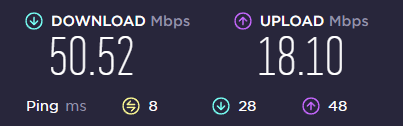
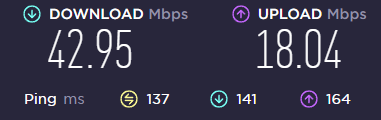
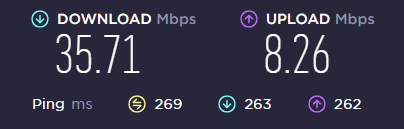
When measured using only the browser (Chrome) extension
When connected to a server in Japan
When connected to a US server
When connecting to a server in Spain
When measuring using only the app
When I tried to measure the speed via the web while connected through the app, the following error appeared, so
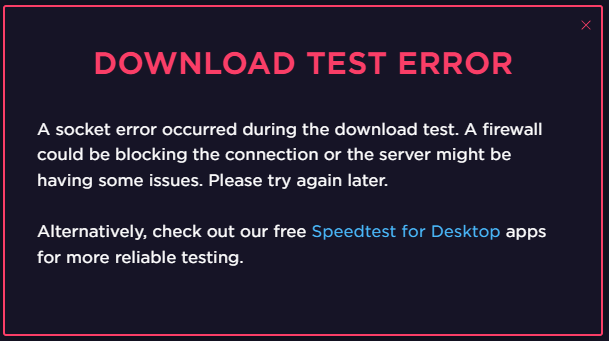
I installed a speed test app to measure the speed.
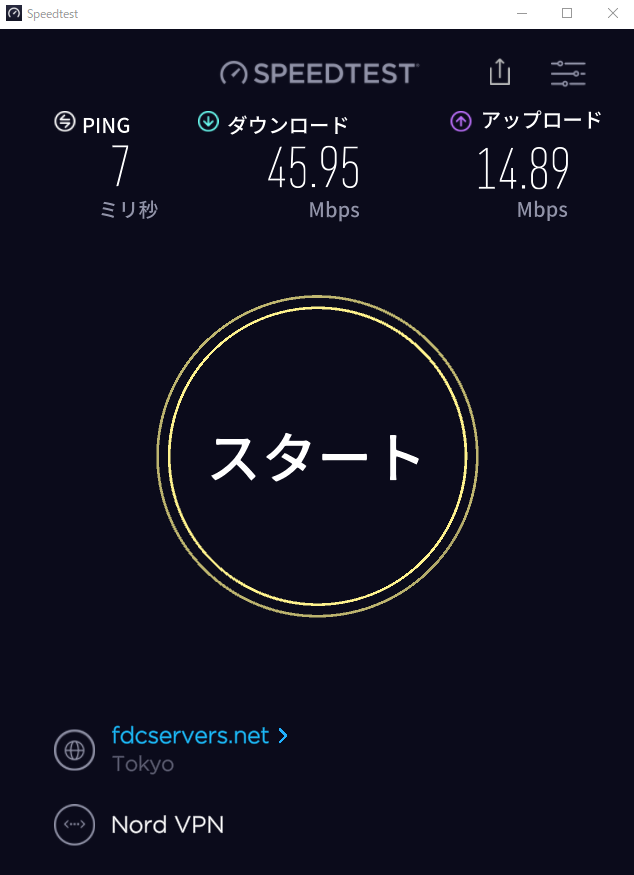
When connected to a Japanese server
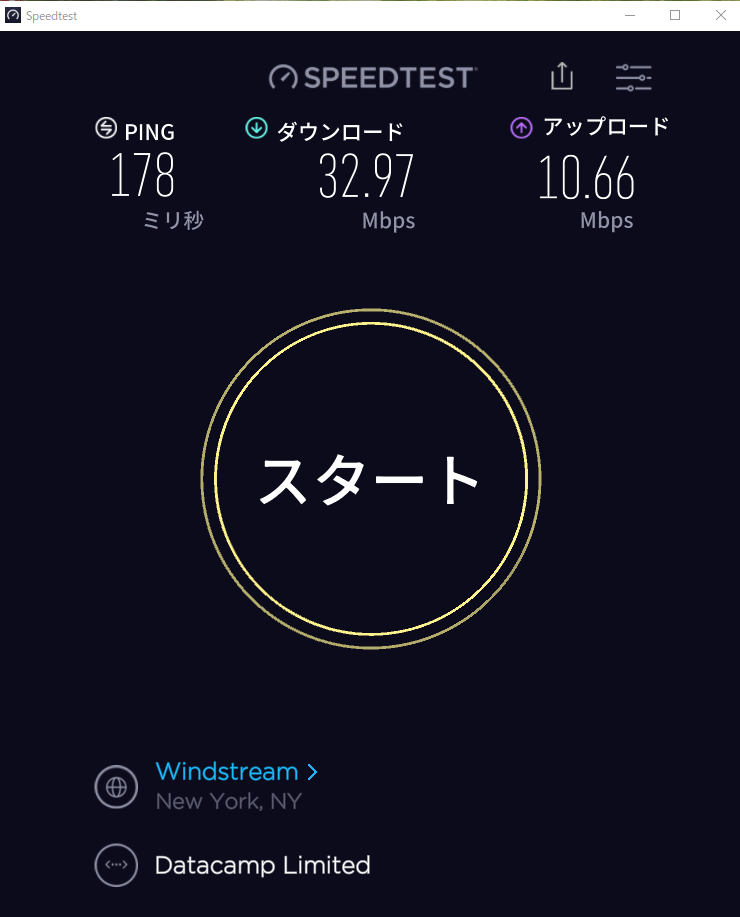
When connecting to a US server
When connected to a server in Spain
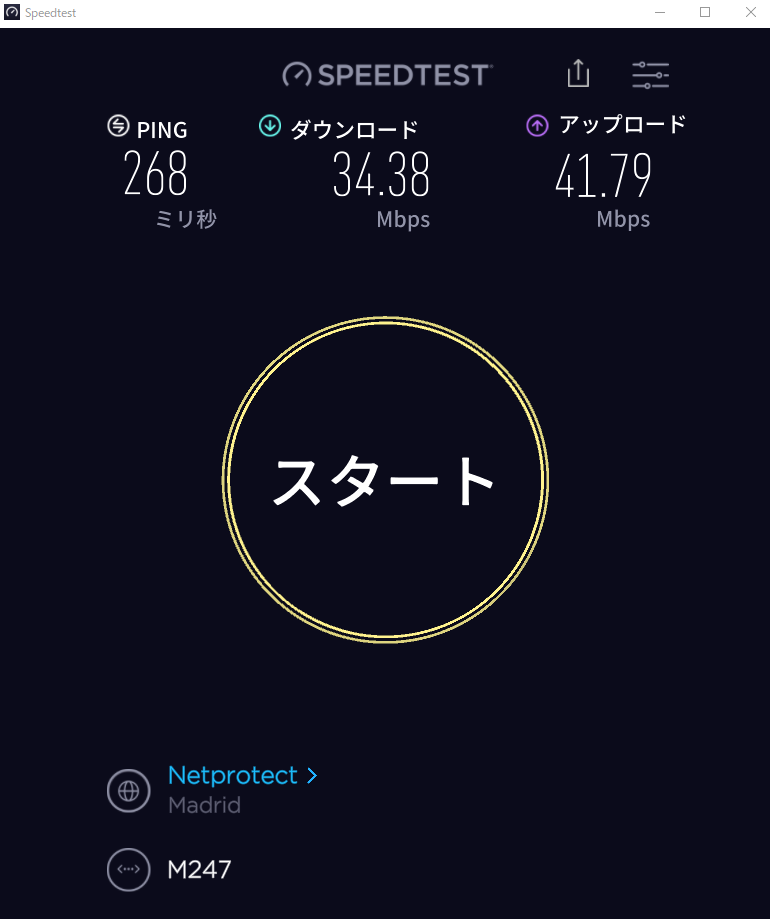
Since I live in an older apartment building, even without a VPN connection, my maximum speeds are around 50 Mbps download and 18 Mbps upload. Considering that, the speed hardly drops at all when connecting to a Japanese server via a web browser extension. It drops slightly in the US, but not enough to be a problem. Even when connecting to Spain, the speed doesn’t drop to the point where it’s unusable.There is a slight drop in speed when connecting via the app compared to the browser extension, but I think it’s within an acceptable range. Since speeds are still above 20 Mbps for video streaming, it’s not a problem.
If both connections are active, some web pages may be difficult to load.
Key Points
With NorVPN, connection speeds don’t slow down much. There are no issues with streaming videos. Using both the browser extension and the app simultaneously can sometimes make it difficult to connect.

Easy to connect via the browser extension
When connecting via the browser extension, clicking the icon in the top-right corner opens a window like the one shown below, allowing you to connect to the VPN with a single click.
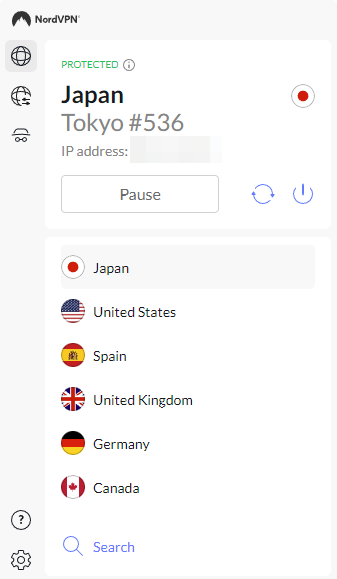
You can also choose the country to connect to. Clicking "Search" allows you to connect to servers in various countries. While connected via VPN, pages may load slightly slower or fail to load at all; in such cases, clicking the "Refresh" button and connecting to a different server often resolves the issue. You can also configure the settings to automatically connect to the VPN when you launch your browser.
Key Points
Connecting via a browser extension is simple and convenient. While you may occasionally have trouble connecting, this is often resolved by clicking the Refresh button to switch servers.
Connecting via the App
To connect via the app, double-click the desktop icon. On Windows, if you’ve set the app to appear in the system tray in the bottom-right corner of the screen when the computer starts up, you can launch the app from there. You can also configure the NordVPN app settings to automatically connect to the VPN when your computer starts up.
When connecting via the NordVPN app on Windows, you can quickly connect by right-clicking the NordVPN icon in the system tray. If you’re having trouble connecting, you can also change servers by clicking the Refresh button.
When you connect to the VPN via the app, go to "Change adapter options" in Settings and look under "Network connections." You’ll see an adapter named "NordLynx" has been created.
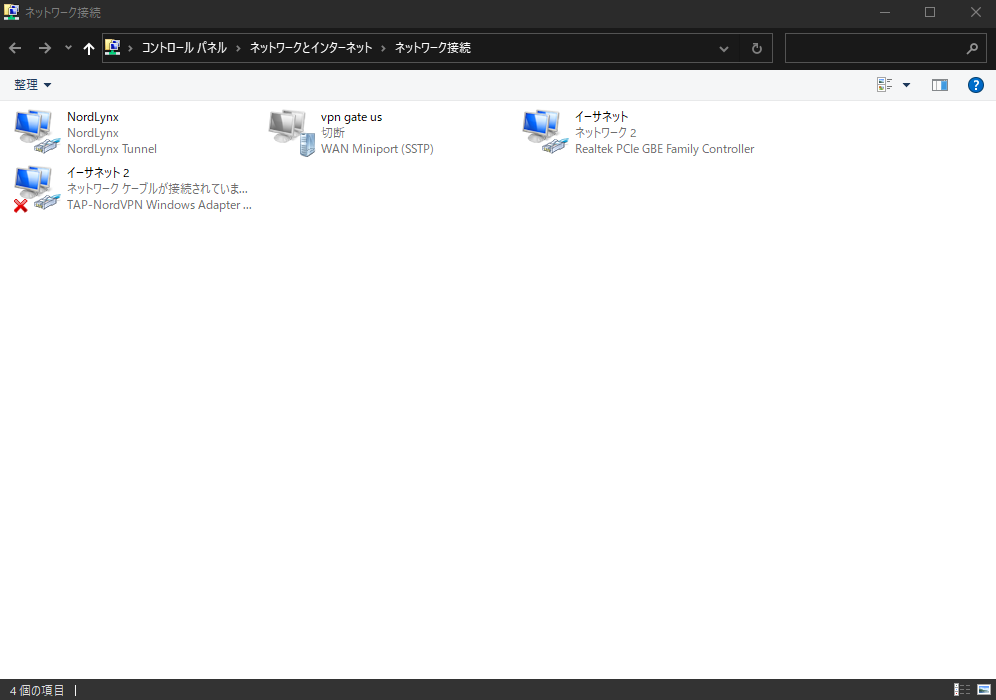
Also, if you check the "Network and Sharing Center," you’ll see that the public network is set to "NordLynx," as shown in the image below.
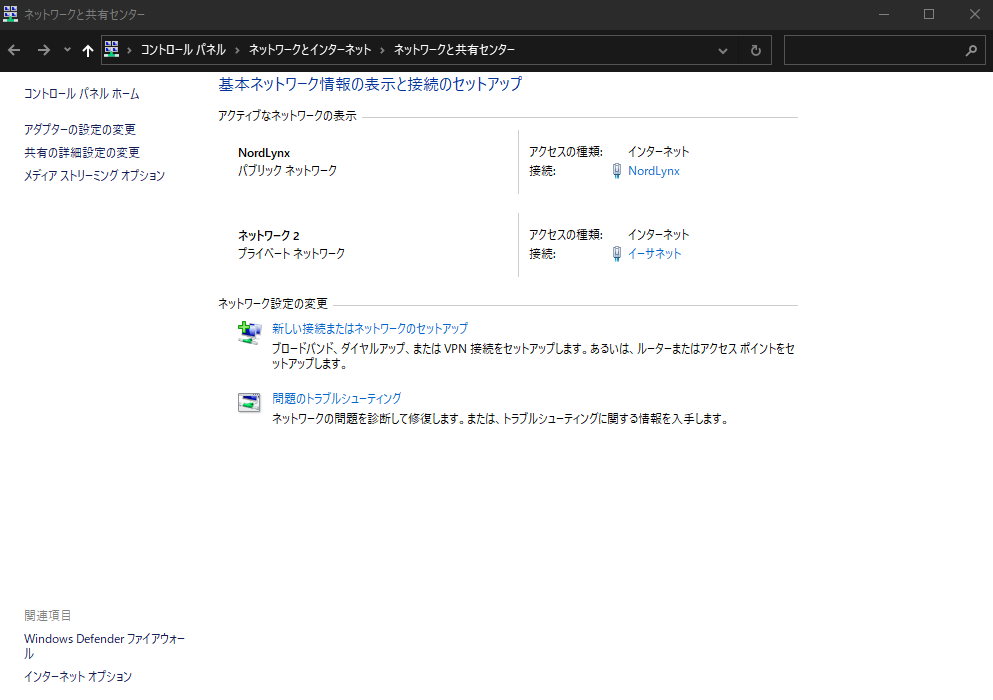
As shown here, when you connect via the NordVPN app, your entire system is connected to NordVPN. This means that applications other than your browser will also connect to the internet through NordVPN.


months free with 1- or
2-year plans—up to 64% off!

When you connect via the NordVPN app, applications other than your browser will also connect to the internet via the VPN. In the NordVPN app settings (the gear icon in the bottom left), you can configure the VPN to be used only by selected applications or exclude selected applications from the VPN connection.
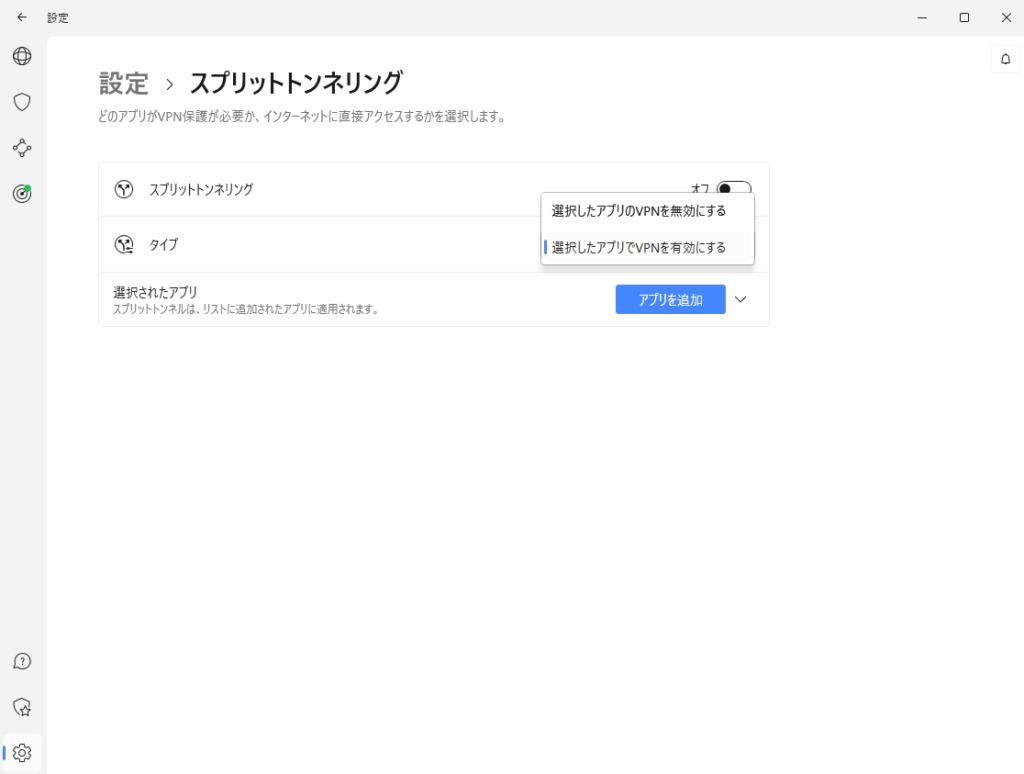
When connecting using only the browser extension, your system’s network connection will be the same as when not connected to the VPN, as shown in the image below.
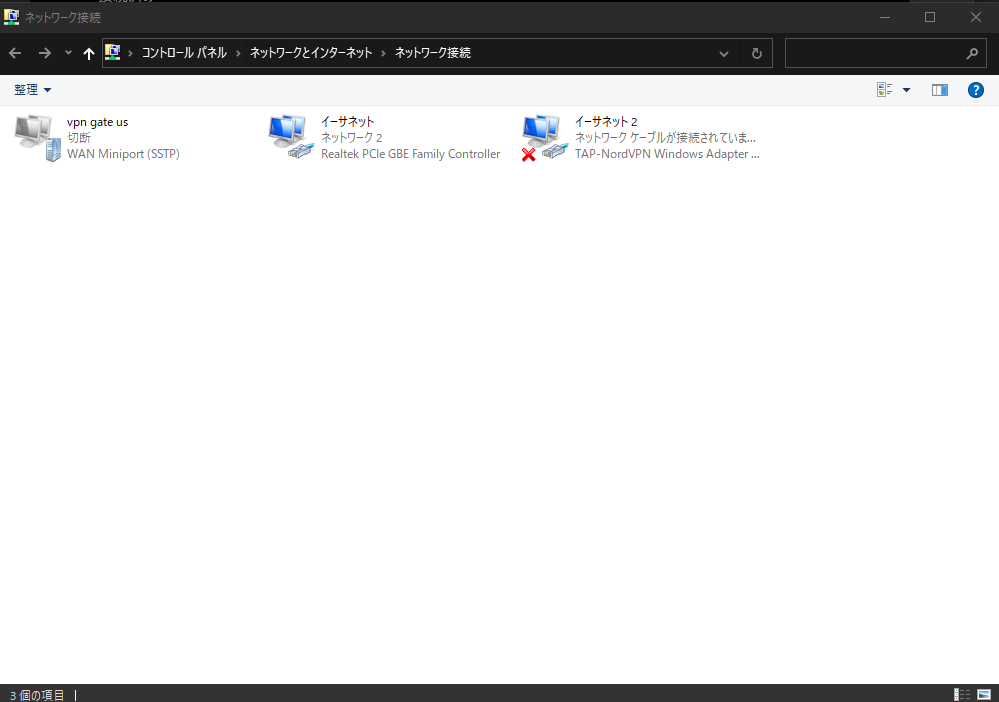
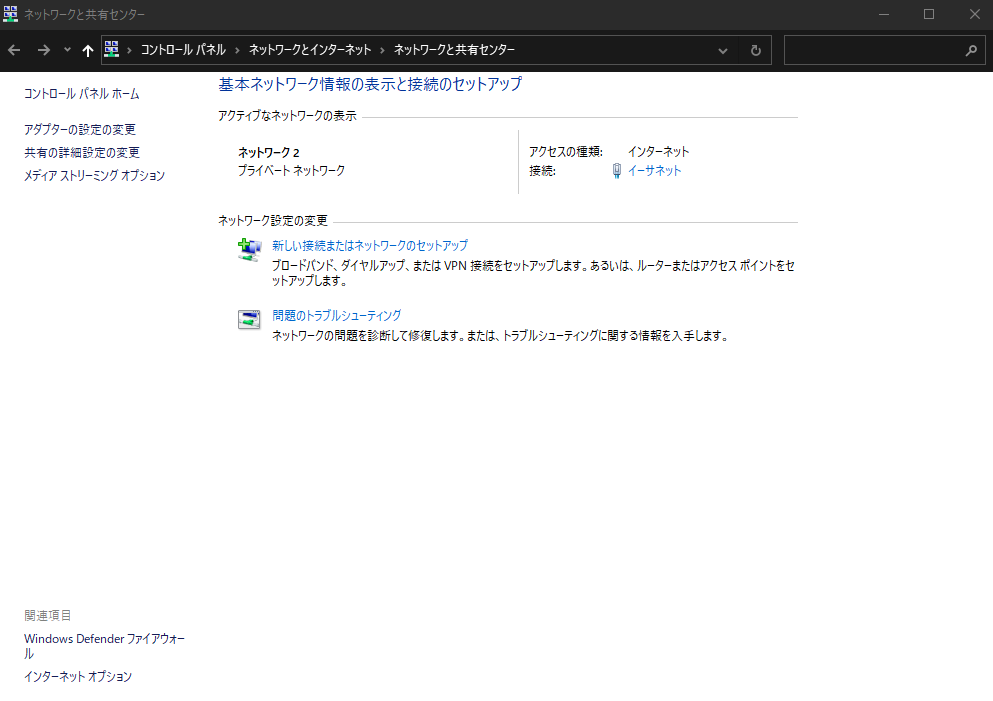
When connected via the NordVPN app, you may occasionally experience slight difficulties accessing websites or notice slower download speeds for app updates. In such cases, on Windows, right-clicking the system tray icon and clicking the "Refresh" button to change servers may resolve the issue.
I usually connect via the browser extension, but if you want to ensure complete security, it might be better to connect using the app.
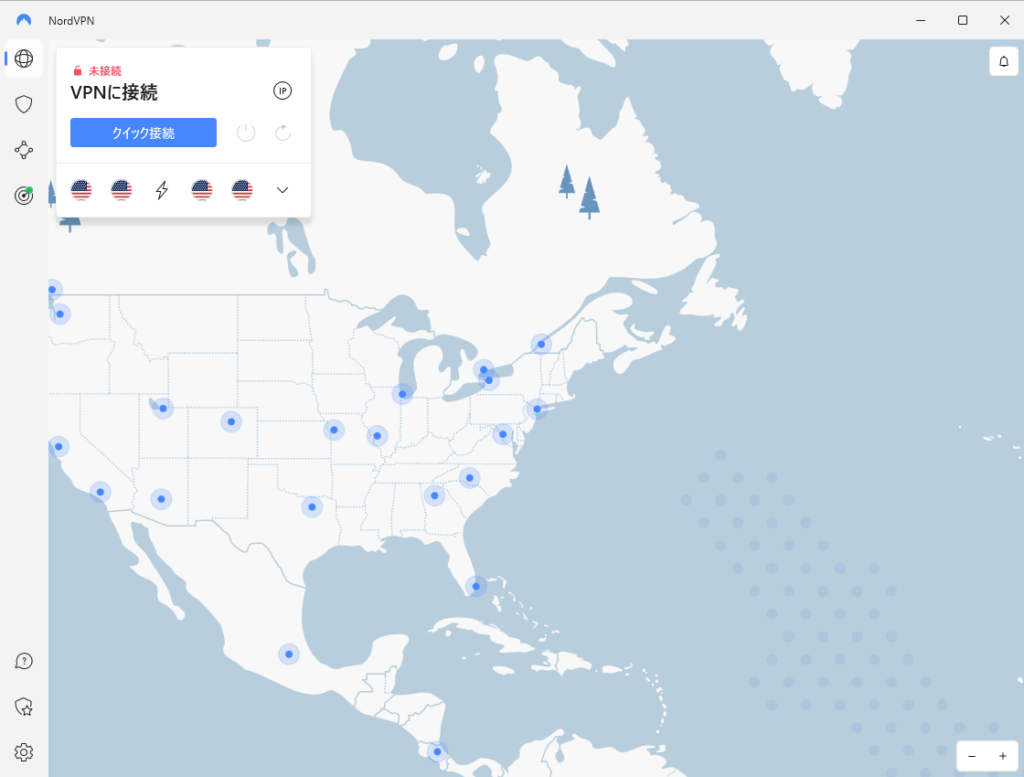
Also, if you left-click the system tray icon to open the NordVPN app, you can select a city to connect to from the world map, as shown in the image below.
Trivia
If you type something like "Japan #" into the search bar in the VPN connection window, a list of servers in that country will be displayed.
Key Points
Connecting via the NordVPN app is like connecting the entire system to the VPN. You can exclude specific applications from the VPN connection or specify which applications should connect.
Supported Devices
The NordVPN
apps are compatible with Windows, macOS, Linux (DEB packages), Android, iOS, and Android TV.
Browser extensions are also available for Google Chrome, Mozilla Firefox, and Microsoft Edge.
For security reasons, you should use a VPN even when connecting to public Wi-Fi on your smartphone or other devices while on the go.
Up to six devices can be used with a single account.
Pricing
As of November 14, 2022, the pricing is as follows.
| Complete Plan | Plus Plan | Standard Plan | |
|---|---|---|---|
| 1-Month Plan | ¥1,840/month | ¥1,680/month | ¥1,550/month |
| 1-Year Plan | ¥870/month (¥13,050 for the first year) 3 months free | ¥710/month (¥10,650 for the first year) 3 months free | ¥580/month (¥8,700 for the first year) 3 months free |
| 2-Year Plan | ¥770/month (¥20,790 for the first 2 years) 3 months free | ¥610/month (¥16,470 for the first 2 years) 3 months free | ¥480/month (¥12,960 for the first 2 years) 3 months free |
Generally, the Standard Plan should be sufficient. If you pay annually or for two years, the monthly rate is lower. Even the monthly payment plan is reasonably priced in terms of features.
Accepted payment methods include credit or debit cards (VISA, American Express, DISCOVER, JCB), PayPal, Google Pay, Amazon Pay, UnionPay, and cryptocurrency.
I’m currently subscribed to the Standard Plan on a monthly basis via PayPal.
Since there’s a 30-day money-back guarantee, it might be worth giving it a try.
Key Points
Even with monthly payments, the price is reasonable considering the high performance. You can lower the monthly cost by opting for annual or two-year payment plans.
Bypass video streaming restrictions
NordVPN
is known for its strong ability to bypass video streaming restrictions. You can watch international content on most streaming sites, including Netflix, Hulu, Amazon Prime Video, TVer, and Disney.
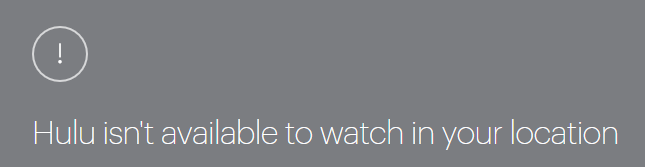
For example, when trying to watch videos from the US or other countries on Hulu, connecting from Japan results in regional restrictions, as shown in the image below, preventing you from watching.
However, by connecting to a U.S. server via NordVPN, I was able to watch the content, as shown in the image below (though the video itself isn’t visible).

Key Points
It excels at bypassing geo-restrictions on overseas videos, allowing you to watch content on most streaming sites. It can also be used to watch Japanese videos from abroad.
NordVPN's Reputation
It seems to have a good reputation for connection speeds. The downside is that there is a limit on the number of devices.
It seems convenient for watching videos released overseas or accessing Japanese video content from abroad.
Summary
As of October 29, 2022, NordVPN operates 5,666 servers across 59 countries, including over 80 servers in Japan. It is a major player in the industry. Additionally, its customer service is increasingly available in Japanese and is of high quality. In terms of security, it utilizes NordLink, which provides faster connections compared to protocols like OpenVPN. It also supports a wide range of devices.Pricing is reasonable for a high-end VPN. It also excels at bypassing video streaming restrictions, making it ideal for watching international videos from Japan or Japanese videos from abroad.
Furthermore, if you use public Wi-Fi on your smartphone or other devices while out and about, we strongly recommend using a VPN for security reasons.
Why not take this opportunity to try NordVPN?
 30-day money-back guarantee! Get 3 months free with a 1- or
2-year subscription
! Up to 64% OFF!
よろしければ応援お願いします


